> For the complete documentation index, see [llms.txt](https://intuitem.gitbook.io/ciso-assistant/llms.txt). Markdown versions of documentation pages are available by appending `.md` to page URLs; this page is available as [Markdown](https://intuitem.gitbook.io/ciso-assistant/features/workflows/variables-and-secrets.md).
# Variables and secrets
Declaring variables, where their values come from, and how secrets are stored and used
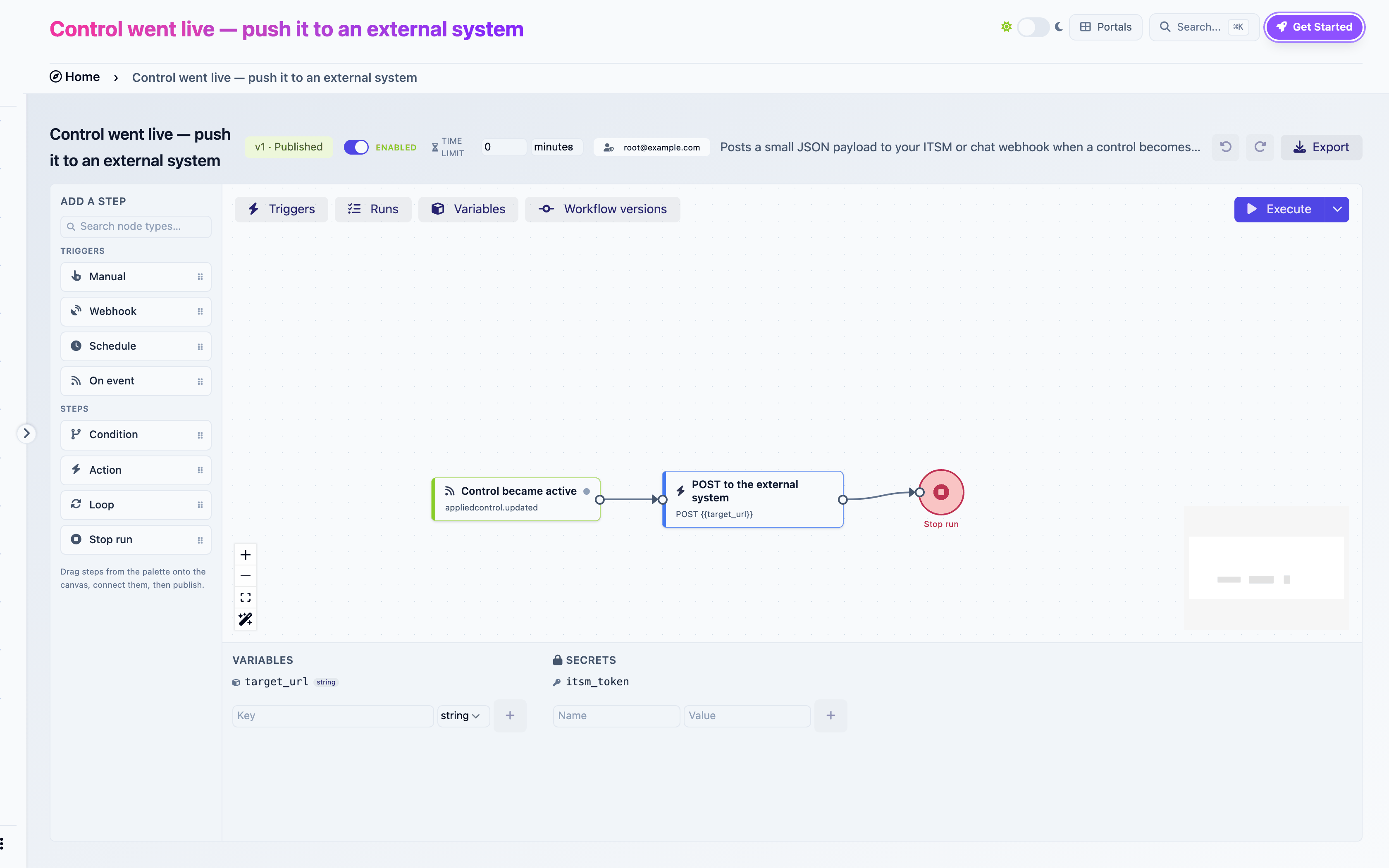
Open the **Variables** toggle in the top-left of the canvas. The panel at the bottom has two columns: variables on the left, secrets on the right.
The Variables panel: one declared variable and one secret, with their creation forms
## Variables
A variable is a named value with a type and a default. Every run starts with the defaults, then triggers, mappings and Set variables steps change them.
| Type | Holds | Compared as |
| --------- | ----------------- | ----------------------------------- |
| `string` | Text | Text |
| `number` | A number | Numerically |
| `boolean` | `true` or `false` | `true`, `1` and `yes` count as true |
| `date` | An ISO date | Text |
| `json` | Any structure | Text |
### Creating one
Type a **Key**, pick a type, click **+**. Keys are identifiers: letters, digits and underscores, starting with a letter or underscore. `now`, `today` and `payload` are reserved.
You can also create a variable where you need it: the variable select of a condition offers **New variable…**, an incoming-data mapping pointing at an unknown key shows a **Create** button.
### Where values come from
| Source | When |
| --------------------------------------------------- | -------------------------------- |
| Default | At run start |
| **Incoming data → variables** on a trigger | At run start, from the payload |
| **Save results to variables** on a step | After that step runs |
| A **Set variables** step | When it runs |
| A **Date offset** step with **Store the result in** | When it runs |
| **Run with variables** | At run start, for one manual run |
### What variables are for
Three things, in practice:
* **Configuration.** `notify_emails`, `target_url`, `framework_urn`. Set the default once, reference it everywhere, change it without touching the steps. Every template does this.
* **Conditions.** A Condition compares variables. Copy a step output into a variable to branch on it.
* **Carrying values across steps.** Usually `{{nodes..}}` is simpler, but a variable survives a Loop boundary and reads better in long graphs.
When a reference run is pinned, the panel shows each variable's value at the end of that run.
## Secrets
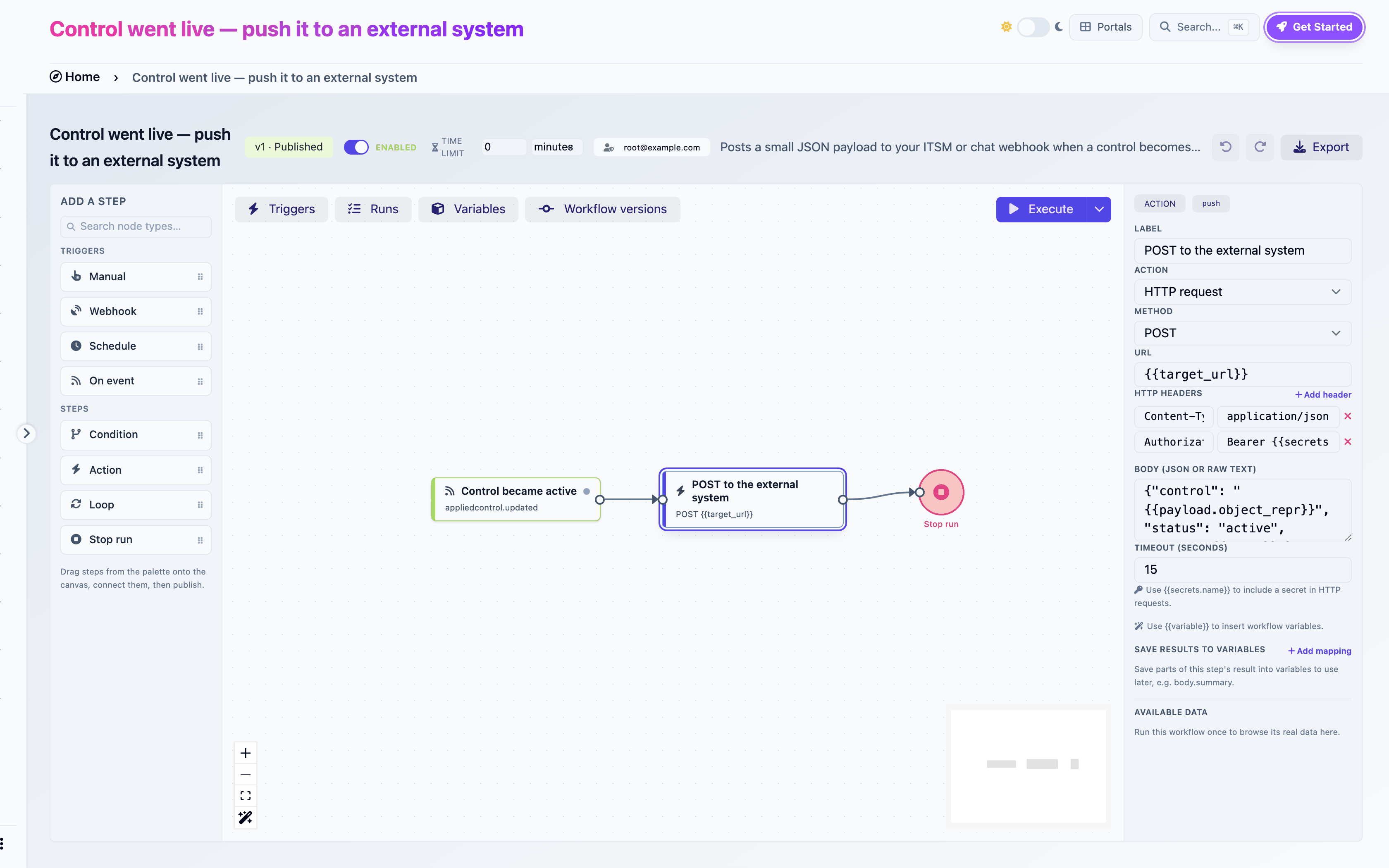
A secret is a named credential: a token, a password. Reference it as `{{secrets.NAME}}` in the URL, headers or body of an **HTTP request**, or in the URL and headers of an **Attach a file to an evidence** step with a URL source. Nowhere else.
### Creating one
Type a **Name** and a **Value**, click **+**. Or, from the **Available data** browser of an HTTP step, click **+** next to Secrets.
### Rules
* **Write-only.** Once saved, the value is never shown again, not in the panel, not in run logs. Replace it by saving a new value under the same name.
* **Per workflow.** Each workflow has its own secrets. Two workflows in the same domain may each have a `TOKEN` and they are unrelated.
* **Never exported.** An exported workflow lists the names of the secrets it requires. Importing asks for the values.
* **https only.** A step referencing a secret is refused over plain `http`.
* **Required to publish.** A step referencing a secret that does not exist fails the publish check `secret_missing`. Create it first, spelled the same.
An HTTP request step whose Authorization header references a secret
---
# Agent Instructions
This documentation is published with GitBook. GitBook is the documentation platform designed so that both humans and AI agents can read, navigate, and reason over technical content effectively. Learn more at gitbook.com.
## Querying This Documentation
If you need additional information that is not directly available in this page, you can query the documentation dynamically by asking a question.
Perform an HTTP GET request on the current page URL with the `ask` query parameter, and the optional `goal` query parameter:
```
GET https://intuitem.gitbook.io/ciso-assistant/features/workflows/variables-and-secrets.md?ask=&goal=
```
`ask` is the immediate question: it should be specific, self-contained, and written in natural language.
`goal` is optional and describes the broader end goal you are ultimately trying to accomplish on behalf of the user. GitBook uses it to tailor the answer towards what is most useful for that goal.
The response will contain a direct answer to the question and relevant excerpts and sources from the documentation.
Use this mechanism when the answer is not explicitly present in the current page, you need clarification or additional context, or you want to retrieve related documentation sections.