> For the complete documentation index, see [llms.txt](https://intuitem.gitbook.io/ciso-assistant/llms.txt). Markdown versions of documentation pages are available by appending `.md` to page URLs; this page is available as [Markdown](https://intuitem.gitbook.io/ciso-assistant/configuration/organization/user-groups.md).
# User groups
User groups are built-in objects giving permissions to all users inside of them, with a specific role across a scope.
Built-in user groups link a domain with a role, which carries a precise set of permissions. Every user in the group receives those permissions on that domain and its sub-domains. If the built-in roles are not granular enough, the PRO edition also lets you define [custom roles](/ciso-assistant/configuration/organization/custom-roles.md).
### Roles
There are 8 built-in roles. The table below gives the high-level shape of each one — the underlying permission matrix has more than 200 entries, so this is deliberately a summary, not an exhaustive list.
| Role | Can | Cannot |
| ---------------------- | --------------------------------------------------------------------------------------------------------------------------------------------------------------------------------------------------------------- | ---------------------------------------------------------------------------------------------------------------------------------- |
| Administrator | Everything, on the whole instance: all business objects, plus domains, users, user groups, roles, libraries, instance settings and backups. Also approves risk acceptances. | — this is the only role that can change instance-wide configuration. |
| Domain manager | Everything an Analyst can, on its own domains, plus creating sub-domains and managing the user groups of those domains. Read access to global objects. | Approve risk acceptances. Manage users, roles, libraries or instance settings. |
| Analyst | Create, update and delete the operational objects of its domains — audits, risk assessments, applied controls, assets, evidences, tasks, findings… Read global and domain objects. | Touch access control (domains, user groups, roles, users). Approve risk acceptances. |
| Reader | Read everything in its domains: assessments, controls, assets, third-party module, dashboards and metrics. | Create, update or delete anything. |
| Approver | Read the objects of its domains, and approve or reject risk acceptances and validation flow steps. | Create or update business objects. Its read scope is slightly narrower than Reader — no third-party module, dashboards or metrics. |
| Respondent | Answer the requirements assigned to it: set compliance results, attach or create applied controls and evidences, comment. See [Assignments / respondent mode](/ciso-assistant/features/assignments.md). | Create audits or assessments. Reach the risk, governance or administration modules. |
| Third-party respondent | The same answering capability as a Respondent, restricted to the questionnaire of the entity assessment the user was invited to. See [Third-Party Risk Management](/ciso-assistant/guides/third-party/tprm.md). | See or do anything outside that questionnaire. Create or update applied controls. |
| Technical tester | Create and run [technical postures](/ciso-assistant/concepts/compliance/technical-postures.md) and their results, and manage the findings binders and findings that follow up on them. | Everything else — read-only on assets, frameworks and perimeters, no access to audits or risk assessments. |
The *Technical tester* role is only useful once the `posture_assessments` feature flag is on (default off) — see [Technical postures](/ciso-assistant/concepts/compliance/technical-postures.md). Its user group is created on every domain regardless.
{% hint style="info" %}
Django superuser is given administrator rights automatically on startup.
{% endhint %}
### Global user groups
Once your instance is created, five user groups are already present:
* Global - Administrator
* Global - Analyst
* Global - Reader
* Global - Approver
* Global - Respondent
They give corresponding permissions on Global scope so on every object of your instance.
### Domain user groups
They are created for each domain you add. For example, if you create a domain *R\&D*, there will be:
* R\&D - Domain Manager
* R\&D - Analyst
* R\&D - Reader
* R\&D - Approver
* R\&D - Respondent
* R\&D - Technical tester
They give corresponding permissions on the domain scope so on every object inside *R\&D*.
The *Third-party respondent* group is the exception: it is not created upfront on domains, but on the [third-party workspace](/ciso-assistant/concepts/specialised-modules/third-party-risk.md#the-third-party-workspace) of an entity, when you invite that third party's contacts to answer a questionnaire. There is one workspace — and therefore one respondent group — per third party per domain, so a vendor assessed several times keeps the same access across rounds.
### Managing group members
You can manage the members of a user group directly from the group's detail page. This is available to administrators, and to domain managers for the groups of their own domains: membership is governed by the *change user group* permission on the group's domain, so a domain manager can add or remove members without needing global user-management rights.
#### Adding members
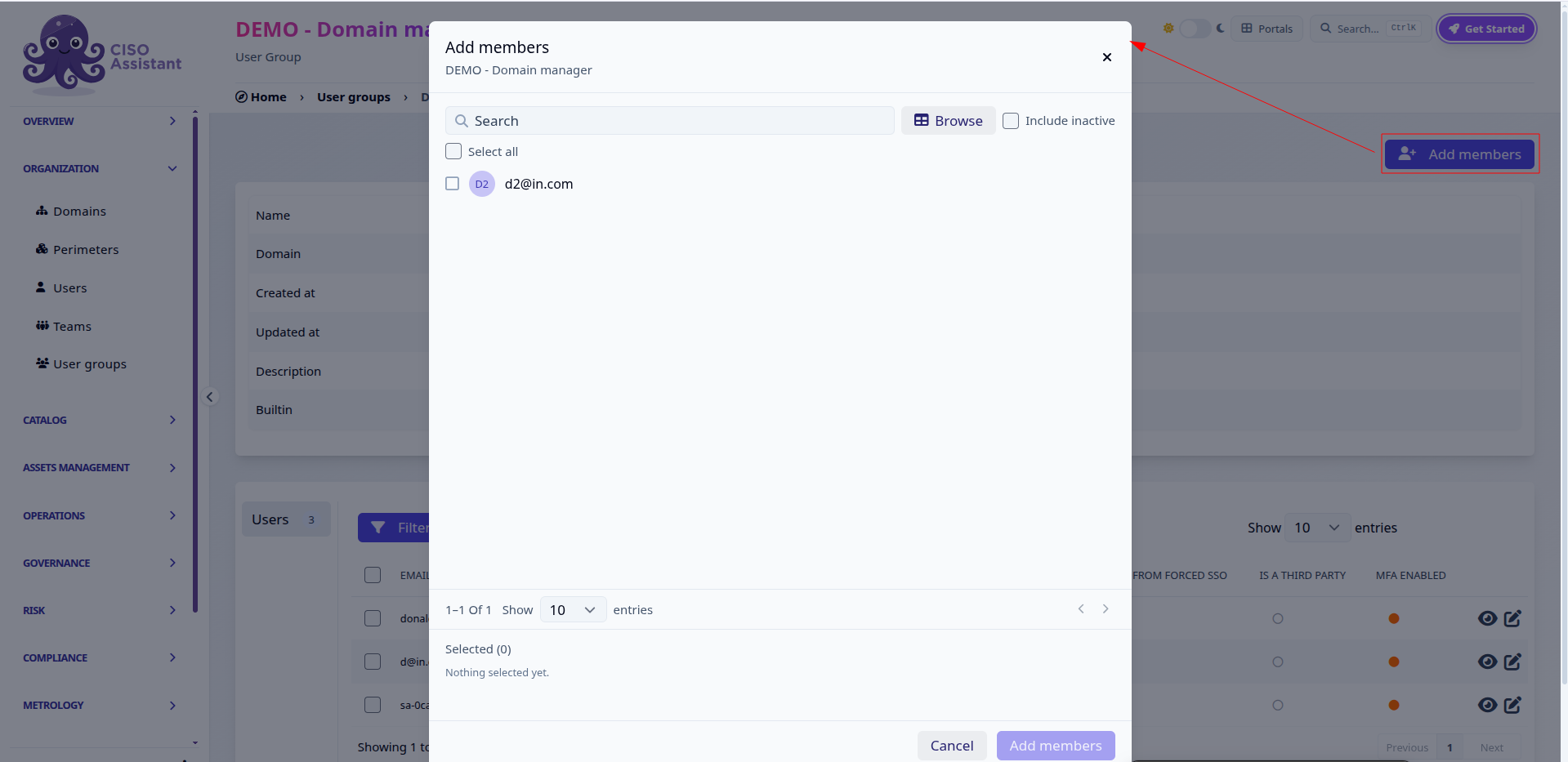
Open the user group and click **Add members**. A picker opens listing the users that are not yet in the group:
* type in the search field to filter by email, first name or last name, or switch to **Browse** for a table view with per-column filters;
* tick **Include inactive** to also list deactivated users;
* your selection is kept while you search and change pages, and is summarised at the bottom of the picker;
* click **Add members** to confirm.
Adding members to a domain user group
#### Removing members
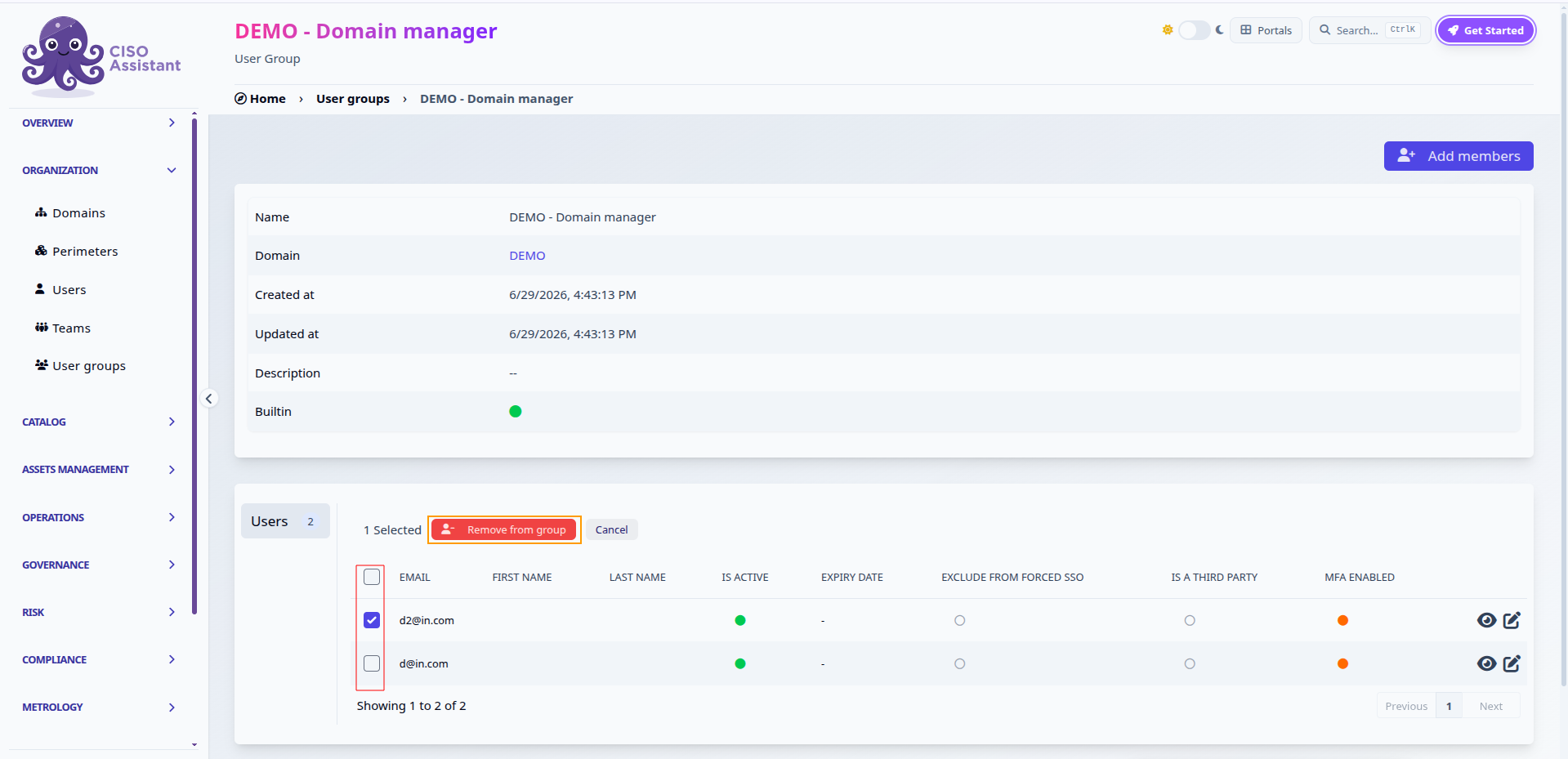
On the group's **Users** tab, tick the members to remove, then click **Remove from group**:
Removing selected members from a user group
{% hint style="info" %}
Two safeguards apply: the last member of the *Global - Administrator* group can never be removed, and domain managers cannot remove themselves from a domain administrator group — another administrator has to do it.
{% endhint %}
---
# Agent Instructions
This documentation is published with GitBook. GitBook is the documentation platform designed so that both humans and AI agents can read, navigate, and reason over technical content effectively. Learn more at gitbook.com.
## Querying This Documentation
If you need additional information that is not directly available in this page, you can query the documentation dynamically by asking a question.
Perform an HTTP GET request on the current page URL with the `ask` query parameter, and the optional `goal` query parameter:
```
GET https://intuitem.gitbook.io/ciso-assistant/configuration/organization/user-groups.md?ask=&goal=
```
`ask` is the immediate question: it should be specific, self-contained, and written in natural language.
`goal` is optional and describes the broader end goal you are ultimately trying to accomplish on behalf of the user. GitBook uses it to tailor the answer towards what is most useful for that goal.
The response will contain a direct answer to the question and relevant excerpts and sources from the documentation.
Use this mechanism when the answer is not explicitly present in the current page, you need clarification or additional context, or you want to retrieve related documentation sections.