> For the complete documentation index, see [llms.txt](https://intuitem.gitbook.io/ciso-assistant/llms.txt). Markdown versions of documentation pages are available by appending `.md` to page URLs; this page is available as [Markdown](https://intuitem.gitbook.io/ciso-assistant/configuration/organization/iam-model.md).
# Understanding the IAM model
Deep dive into CISO Asisstant IAM model
Access security is a foundational aspect of any risk or compliance management platform. In this article, we’ll explore how **authentication**, **authorization**, and **accounting** — the three pillars of the AAA model — are structured and applied within **CISO Assistant**.
***
### 1. Authentication: SAML vs OIDC
CISO Assistant integrates with leading identity providers (IdPs) via **SAML** and **OIDC**, enabling secure and seamless single sign-on (SSO).
#### SAML
* legacy protocol based on XML
* common in large enterprises, especially for AD
* browser-based redirection with signed assertions
#### OIDC (OpenID Connect)
* modern standard built on OAuth2
* uses JWT tokens for identity transport
* also browser-based, but more lightweight and versatile
> **Recommendation**: If your IdP supports both, **prefer OIDC** — it's more modern, flexible, and aligned with today’s security practices.
***
### 2. MFA
Multi-Factor Authentication (MFA) is critical for access protection. CISO Assistant supports MFA in two distinct modes, depending on how users authenticate:
#### SSO-Based Authentication (SAML / federated OIDC)
* MFA is handled entirely by the identity provider (IdP)
* the IdP enforces the policy (push notifications, TOTP, biometrics, etc.)
#### Local Authentication
* for local accounts, CISO Assistant includes native MFA
* based on **TOTP** (e.g., Google/Microsoft Authenticators) and **WebAuthn / passkeys** (hardware security keys, platform authenticators)
* recovery codes are issued at enrolment so the user can self-recover from a lost factor
* if a user loses every factor and runs out of recovery codes, an **administrator can disable their MFA** from the user's edit page — see [Setting up MFA → Admin recovery](/ciso-assistant/configuration/mfa.md#admin-recovery-disabling-another-users-mfa). The link is hidden on your own edit page; to disable your own MFA, use the standard MFA settings page on My profile → Settings.
***
### 3. Authorization: Structured and Hierarchical RBAC
CISO Assistant implements a robust **Role-Based Access Control (RBAC)** model that balances flexibility, clarity, and operational simplicity.
#### Fine-Grained Permissions
Each object type has granular **CRUD permissions** (create, read, update, delete). This model applies across all business entities: users, backups, risks, policies, incidents, data processing, and more. There are more than 200 permissions in CISO Assistant.
#### Predefined Roles
Permissions are grouped into a small set of **standard roles** — Administrator, Domain manager, Analyst, Reader, Approver, Respondent, Third-party respondent and Technical tester.
See [User groups → Roles](/ciso-assistant/configuration/organization/user-groups.md#roles) for what each of them can and cannot do.
#### Hierarchical Domains
Roles are assigned **within a domain** — a flexible concept representing any relevant business context.
For example, a domain can represent:
* a **legal entity**
* a **country** or **region**
* a **subsidiary**
* a **business unit**
* any other meaningful organizational structure
> Domains are **hierarchical**: a role assigned to a parent domain (e.g., "Group") automatically applies to all its subdomains (e.g., subsidiaries, teams).
#### Role Assignments
Access control is defined via explicit assignments:
> *A role* ➡️ *on a domain* ➡️ *for a group of users*
#### User Groups
Users **do not have direct roles**. They inherit permissions through **membership in one or more groups**.
Groups act as the central pivot for managing access:
* receive role assignments
* grant users permissions via group membership
* defined locally
* optionally synced with an IdP (via external plugin)
🚀 This simple yet powerful model accommodates the vast majority of real-world access scenarios. And when needed, the system is fully extensible: it supports **custom roles**, **custom role assignments**, and **custom user groups** to fit even the most specific organizational needs.
***
### 4. Machine Identity: Personal Access Tokens with Expiration & Control
CISO Assistant doesn’t just secure human access — it also supports secure, auditable access for **automated systems** and **integrations** through **Personal Access Tokens (PATs)**.
#### Definition
A **Personal Access Token** is a time-limited secret that allows a script, CI/CD pipeline, or service to authenticate with the platform's API on behalf of a user or machine identity — without requiring an interactive login.
#### Key features
* **time-bounded**: expiration is mandatory
* **RBAC-compliant**: inherits the creator’s permissions
* **revocable**: can be revoked by user or admin
#### Governance controls
* admins can restrict who may generate PATs
* all tokens are auditable and managed via UI or API
> This ensures **tight control over non-human access**, balancing automation flexibility with strict security hygiene.
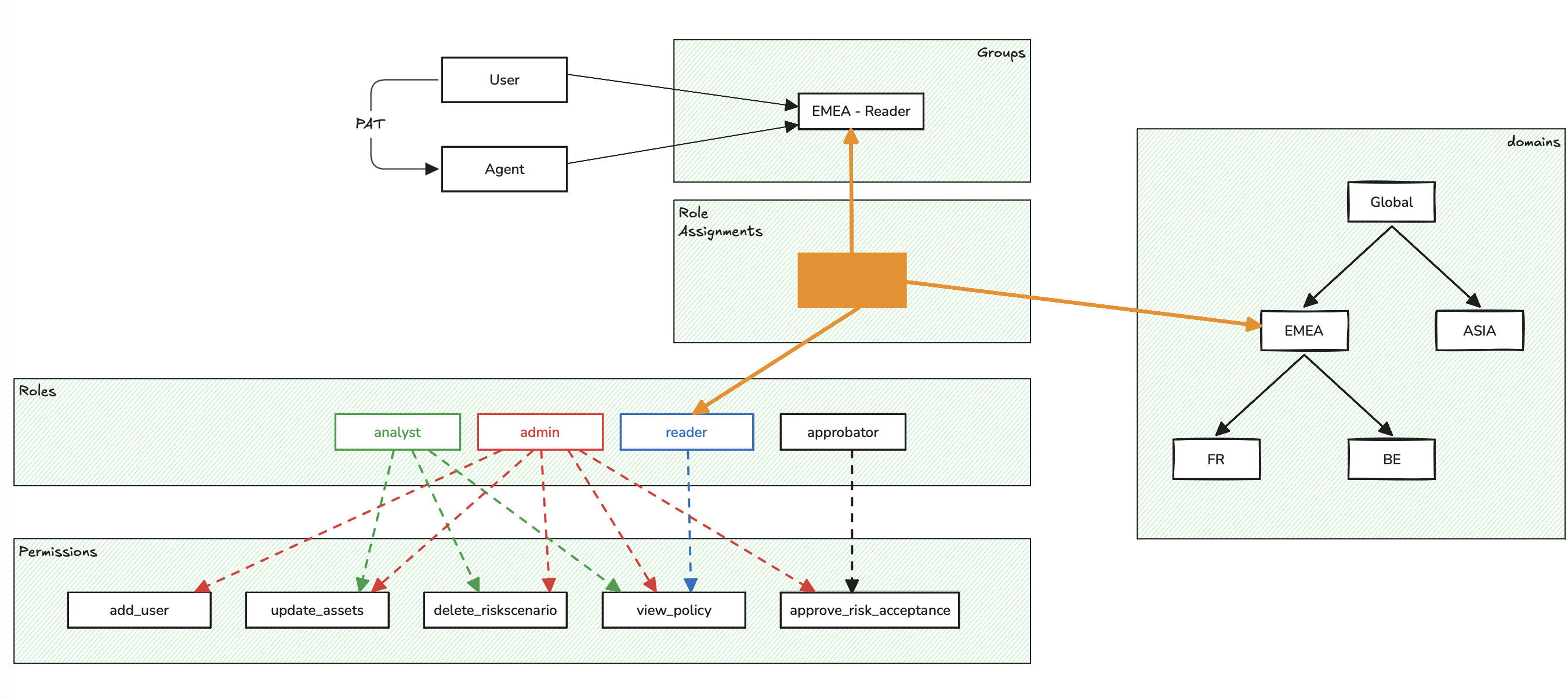
### 5. Illustration
The following schematic illustrates the fundamental concepts of IAM in CISO Assistant.
### 6. Default role mechanism
Every domain has **members**: the people its own and its sub-domains' IAM groups grant roles to. A domain can carry a **default role** — the role it grants its members, on the domain itself: never recursively, and only there.
For example: if the **Domain** domain has the **Baseline reader** default role, then a user granted any role on **Domain** itself or on its sub-domain **ChildDomain** through the IAM groups is a member of **Domain**, and receives **Baseline reader** on it.
Who is *not* a member follows from the definition — no exception list to remember:
* **third parties** hold their grants inside third-party workspaces, which are not the domain's groups → never members;
* **service accounts** hold direct role assignments — no group grants them anything, so they read exactly what their own assignment names (least privilege by design);
* a grant made outside the IAM groups (a direct assignment) gives exactly what it names, nothing ambient;
* deactivated users cannot sign in and therefore exercise no permission at all.
Only roles containing view permissions can be used as a default role, and enclave domains cannot carry one.
Configuring default roles is an **enterprise** capability: the domain form exposes the control there, and it can be tuned per domain — set to a narrower view-only role, or **cleared entirely** for domains that should share nothing ambiently. Clearing the root domain's default role gives the instance an **explicit-grant policy**: no ambient visibility at all, every access traceable to an assigned role. In the community edition, the default role exists only on the root domain, fixed to **Baseline reader**, and cannot be changed.
#### Can I make an object visible to all users without attaching it to global?
Yes — the shelf pattern: attach the object to a sub-domain (e.g. named "shared"), and add the intended readers to that sub-domain's reader group. This uses ordinary role assignments only, works for any object type, and the audience is exactly the group's member list — explicit and auditable.
### 7. Accounting: Full Audit and Traceability
CISO Assistant includes native tracking of all key actions:
* logins, restorations, configuration changes, approvals…
* a searchable audit log accessible via the UI or API
> This enables complete accountability over critical operations.
### In Summary
CISO Assistant's AAA model is built on:
* **Open standards** (SAML, OIDC, TOTP, RBAC)
* A **structured yet manageable authorization system**
* **secure automation** through scoped, revocable **Personal Access Tokens** (PATs)
* **Built-in traceability** from the ground up
It supports complex organizations while remaining readable, scalable, and compliant with modern security expectations.
---
# Agent Instructions
This documentation is published with GitBook. GitBook is the documentation platform designed so that both humans and AI agents can read, navigate, and reason over technical content effectively. Learn more at gitbook.com.
## Querying This Documentation
If you need additional information that is not directly available in this page, you can query the documentation dynamically by asking a question.
Perform an HTTP GET request on the current page URL with the `ask` query parameter, and the optional `goal` query parameter:
```
GET https://intuitem.gitbook.io/ciso-assistant/configuration/organization/iam-model.md?ask=&goal=
```
`ask` is the immediate question: it should be specific, self-contained, and written in natural language.
`goal` is optional and describes the broader end goal you are ultimately trying to accomplish on behalf of the user. GitBook uses it to tailor the answer towards what is most useful for that goal.
The response will contain a direct answer to the question and relevant excerpts and sources from the documentation.
Use this mechanism when the answer is not explicitly present in the current page, you need clarification or additional context, or you want to retrieve related documentation sections.