> For the complete documentation index, see [llms.txt](https://intuitem.gitbook.io/ciso-assistant/llms.txt). Markdown versions of documentation pages are available by appending `.md` to page URLs; this page is available as [Markdown](https://intuitem.gitbook.io/ciso-assistant/configuration/organization.md).
# Organization
You can find here CISO Assistant global organization. All entities will be linked to or contained within these objects.
## A folder organization
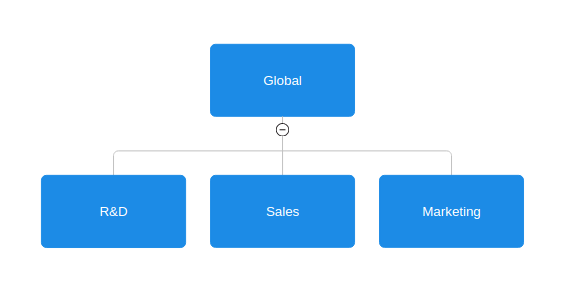
For Access Control purpose, CISO Assistant data is organized in a tree of folders. Starting from a root folder called Global, it divide into sub-folders called domains. The organization of the tree is not hard-coded, it is entirely determined by configuration. Any object in CISO Assistant is attached to a folder (including folders), either directly or indirectly through a parent object that is attached to a folder.
Organization example
### So, what is a domain?
A domain permits to organize your work depending on your use of CISO Assistant. For example, inside a company, you can create a domain for each department for which you need to carry out a variety of perimeters, or if you have different customers, you may as well have a domain for each one in order **to delimit your work area**.
#### Utility
A domain is the first thing you create on CISO Assistant. It will **bring together** all objects you need to complete your different perimeters. Every **role/permission** a user has on a domain **are applicable to all objects/actions** across the domain. It's all about organization, the only technical aspect is access control, and this is achieved by adding the user to the relevant user group.
#### Role assignment
In the first/open source version of CISO Assistant, custom role assignment is not available. So, when you create a domain, user groups concerning this domain are automatically created for each built-in role. All you need to do, is to assign your users to their user groups. To learn more about this, jump to [User groups](/ciso-assistant/configuration/organization/user-groups.md).
## Perimeters
Perimeters are fundamental context objects defined by the entity using CISO Assistant. They are grouped in domains. They will contain all your risk and audits. Apart from being able to group your various evaluations across the different domains.
There are two specific fields, internal reference and status. Here are the various status options:
* \-- (None)
* Design
* Development
* Production
* End of life
* Dropped
The purpose of a perimeter is at first, it's organizational aspect to solve a problem. But it also makes it possible to improve analytics by breaking them down according to the different assessments, whether for risk or compliance, so as to make your project management more precise and reduce noise.
## User Groups
User groups go hand in hand with domains. they associate permissions with users and define their scope, by being attached to a domain. They follow a simple and consistent RBAC model from a role containing permissions and a domain determining the perimeter. Go to the [User groups](/ciso-assistant/configuration/organization/user-groups.md) page for more details.
---
# Agent Instructions
This documentation is published with GitBook. GitBook is the documentation platform designed so that both humans and AI agents can read, navigate, and reason over technical content effectively. Learn more at gitbook.com.
## Querying This Documentation
If you need additional information that is not directly available in this page, you can query the documentation by asking a question.
Perform an HTTP GET request on the following URL with the `ask` and `goal` query parameters:
```
GET https://intuitem.gitbook.io/ciso-assistant/configuration/organization.md?ask=&goal=
```
`ask` is the immediate question: it should be specific, self-contained, and written in natural language.
`goal` is what the user is ultimately trying to achieve, the reason they need the answer. Sharing it helps GitBook give you a better, more relevant answer. A goal is most helpful when it describes the outcome the user wants rather than restating the question. For example, with `ask=how do I create an API token`, a goal like `automate deployments from our CI pipeline` lets GitBook tailor the answer to that use case.
The response will contain a direct answer to the question and relevant excerpts and sources from the documentation.
Use this mechanism when the answer is not explicitly present in the current page, you need clarification or additional context, or you want to retrieve related documentation sections.