> For the complete documentation index, see [llms.txt](https://intuitem.gitbook.io/ciso-assistant/llms.txt). Markdown versions of documentation pages are available by appending `.md` to page URLs; this page is available as [Markdown](https://intuitem.gitbook.io/ciso-assistant/concepts/operations/workflows.md).

# Workflows

Automation that reacts to what happens in the platform, on a schedule, on an event or on a webhook, and notifies, reads, creates or updates objects on your behalf

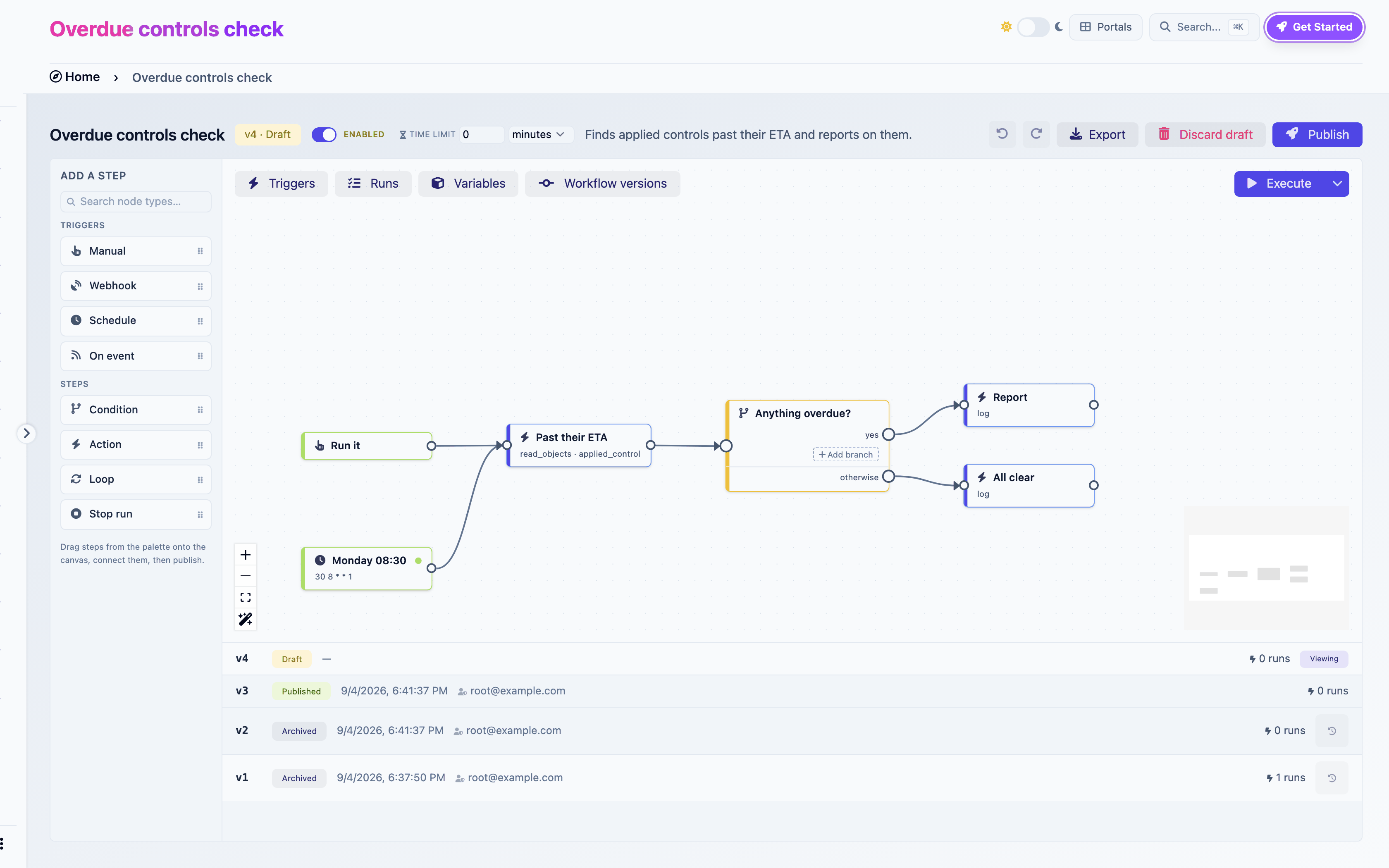
Workflows automate what happens in CISO Assistant. A workflow reacts to something (a schedule, an object changing, an external system calling in, or you pressing a button), then runs a series of steps: read objects, create or update them, branch on a value, loop over a list, send an email, call an external system.

You build workflows visually, on a canvas. No code is involved, and everything a workflow does is bounded by the permissions of the person who published it.

<figure><img src="https://629777851-files.gitbook.io/~/files/v0/b/gitbook-x-prod.appspot.com/o/spaces%2FCqFeU3oPCgDWkkR386NK%2Fuploads%2Fgit-blob-9c9fcc0186fabc1167d1fd9c69e377d5066bcb8f%2Fworkflows-hero-builder.png?alt=media" alt="The builder: the weekly digest template open, its loop step selected, the Triggers panel showing the enabled schedule"><figcaption><p>The builder: the weekly digest template open, its loop step selected, the Triggers panel showing the enabled schedule</p></figcaption></figure>

{% hint style="info" %}
**Workflows** (automation) and **Validation flows** (sign-off) are different things. A validation flow routes an object to a person for a decision. A workflow reacts to changes and does work. A workflow can tell you that an approval is waiting, it can never grant one. See [Validation flows](/ciso-assistant/concepts/governance/validation-flows.md).
{% endhint %}

## What you can automate

| Pattern      | Example                                                                                  |
| ------------ | ---------------------------------------------------------------------------------------- |
| Digests      | Every Monday, email the controls past their ETA                                          |
| Reactions    | When a finding is created at high severity, open a remediation control and link it       |
| Sweeps       | Every night, mark lapsed security exceptions as expired                                  |
| Intake       | A scanner posts vulnerabilities to a URL and each one is recorded                        |
| Collection   | Every night, pull an export from a tool, file it as evidence and record what it measured |
| Triage       | Ask a model to classify an incoming finding, then branch on its answer                   |
| Outbound     | When a control goes live, post to your ITSM or chat tool                                 |
| Provisioning | Create a domain, its groups and its first user in one run                                |

Thirty ready-made workflows ship as [templates](/ciso-assistant/features/workflows/templates.md). Most people start by installing one and adapting it.

## A workflow is a graph

A workflow is a set of **steps** connected by **wires**. A run starts at a **trigger** step and follows the wires. Where a step has several outgoing wires, all of them run, in parallel. Where you want only one path, you use a Condition step, which picks exactly one of its branches.

```
[Monday 08:30] ──▶ [Read overdue controls] ──▶ [Loop] ──each──▶ [Log one line] ──┐
                                                  ▲                                │
                                                  └────────────────────────────────┘
                                                  └──done──▶ [Email the digest] ──▶ [Stop run]
```

A path ends when it reaches a step with no outgoing wire, or a Stop run step. The difference matters: an unconnected step ends that path only, while Stop run ends the whole run, including paths still executing elsewhere.

## Versions: draft, published, archived

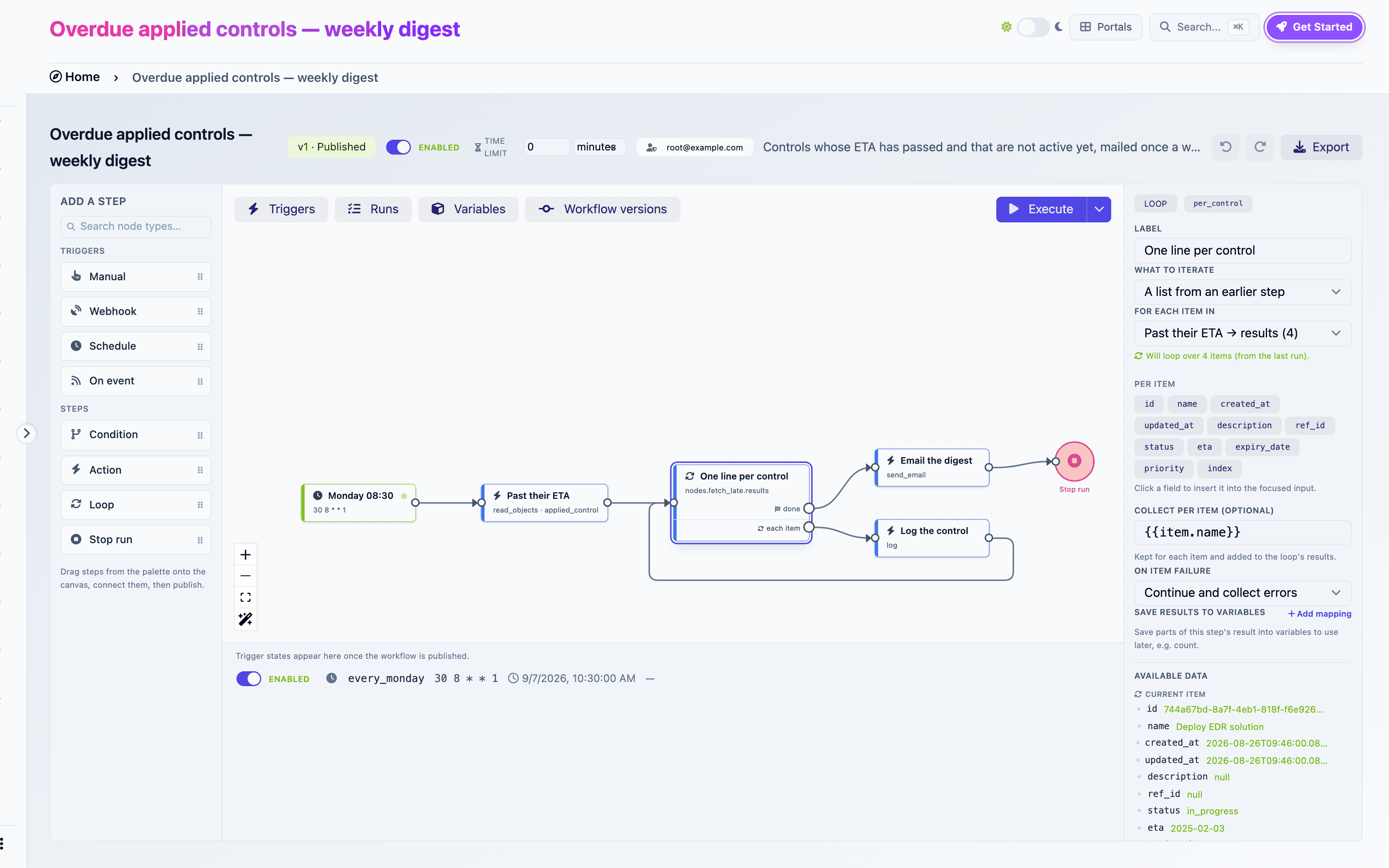
A workflow has versions. At any time it has at most one **draft** and at most one **published** version. Older published versions are **archived**.

| State     | Editable                           | Runs automatically                 | Can be executed by hand |
| --------- | ---------------------------------- | ---------------------------------- | ----------------------- |
| Draft     | Yes                                | No                                 | Yes, as you             |
| Published | No. Editing it creates a new draft | Yes, when its triggers are enabled | Yes, as its publisher   |
| Archived  | No. Can be restored as a new draft | No                                 | No                      |

Publishing is the moment a graph becomes real. It runs a set of [checks](/ciso-assistant/features/workflows/publish-checks.md), freezes the graph, registers its triggers and stamps the publisher as the version's **run identity**. The previously published version is archived. Runs that were already in flight keep executing their own frozen version.

You can always edit a published workflow. The first change you make silently creates a new draft. The published version keeps running until you publish the draft, and you can discard the draft at any time to go back.

<figure><img src="https://629777851-files.gitbook.io/~/files/v0/b/gitbook-x-prod.appspot.com/o/spaces%2FCqFeU3oPCgDWkkR386NK%2Fuploads%2Fgit-blob-76d97e79470514719dd799c92871421db4f75cbf%2Fworkflows-concepts-versions.png?alt=media" alt="Workflow versions"><figcaption><p>Workflow versions</p></figcaption></figure>

## Runs

A **run** is one execution of one version. It has a status:

| Status    | Meaning                                                                       |
| --------- | ----------------------------------------------------------------------------- |
| Active    | Still executing, or waiting for an email to be delivered                      |
| Completed | Every path finished, or a Stop run step was reached with no failure elsewhere |
| Failed    | A step failed, or the run hit its time limit                                  |

Each run keeps its **variables**, the **payload** that started it, the **output of every step**, and a **log** of everything that happened. You browse all of it from the Runs panel, replay it on the canvas, and pin a run as reference data so the builder can show you real values while you edit.

## Data flows through expressions

Steps exchange data through [expressions](/ciso-assistant/features/workflows/expressions.md): `{{today}}`, `{{payload.object_repr}}`, `{{nodes.fetch_late.count}}`, `{{item.name}}`. A step's settings are text with expressions inside. When the step runs, the expressions are replaced with values from the run.

**Variables** are named values declared on the workflow with a type and a default. A trigger can fill them from incoming data, a Set variables step can assign them, and conditions compare against them.

**Secrets** are named credentials for HTTP calls. They are write-only and scoped to one workflow.

## Scope and identity

A workflow lives in a **domain**. Its runs can only see and change objects in that domain and its sub-domains. Every published version runs **as the person who published it**, with their permissions checked live at every step. Publishing grants nothing: you can automate exactly what you could do by hand, in the domain where the workflow lives.

Read [Permissions and security](/ciso-assistant/features/workflows/permissions-and-security.md) for the full model.

## Vocabulary

| Term          | Meaning                                                            |
| ------------- | ------------------------------------------------------------------ |
| Step          | A node on the canvas: trigger, Condition, Action, Loop or Stop run |
| Wire          | A connection between two steps                                     |
| Trigger       | The step a run starts at                                           |
| Branch        | One output of a Condition step, with its own conditions            |
| Ref           | A step's identifier in expressions, derived from its label         |
| Run           | One execution of a version                                         |
| Run identity  | The user whose permissions a published version's runs use          |
| Reference run | The run pinned in the builder to show real data while editing      |
| Template      | A ready-made workflow shipped as a library                         |

## Where to go

* [Building your first workflow](/ciso-assistant/guides/getting-started/first-workflow.md): enable the feature and build one end to end.
* [Workflow builder](/ciso-assistant/features/workflows.md): every part of the canvas, then triggers, steps, expressions, variables, runs, sharing and troubleshooting.
* [Template catalog](/ciso-assistant/features/workflows/templates.md): the ready-made workflows and which one to start from.
* [Permissions and security](/ciso-assistant/features/workflows/permissions-and-security.md): who a run acts as and what it can reach.


---

# Agent Instructions
This documentation is published with GitBook. GitBook is the documentation platform designed so that both humans and AI agents can read, navigate, and reason over technical content effectively. Learn more at gitbook.com.

## Querying This Documentation
If you need additional information that is not directly available in this page, you can query the documentation dynamically by asking a question.

Perform an HTTP GET request on the current page URL with the `ask` query parameter, and the optional `goal` query parameter:

```
GET https://intuitem.gitbook.io/ciso-assistant/concepts/operations/workflows.md?ask=<question>&goal=<endgoal>
```

`ask` is the immediate question: it should be specific, self-contained, and written in natural language.
`goal` is optional and describes the broader end goal you are ultimately trying to accomplish on behalf of the user. GitBook uses it to tailor the answer towards what is most useful for that goal.

The response will contain a direct answer to the question and relevant excerpts and sources from the documentation.

Use this mechanism when the answer is not explicitly present in the current page, you need clarification or additional context, or you want to retrieve related documentation sections.