> For the complete documentation index, see [llms.txt](https://intuitem.gitbook.io/ciso-assistant/llms.txt). Markdown versions of documentation pages are available by appending `.md` to page URLs; this page is available as [Markdown](https://intuitem.gitbook.io/ciso-assistant/concepts/operations/applied-controls.md).
# Applied controls
An **applied control** is the main building block of the action plan: the actual action your team has implemented or will implement to address a security need. It can be technical, organisational, a process, a policy, a piece of documentation — anything that materially changes risk or compliance posture.
A single applied control can satisfy any number of requirements across any number of frameworks — it's where *what the framework asks* meets *what the organisation actually does*.
## Mental model
```mermaid
graph LR
RC[Reference control] -.->|templates| AC
T[Task] -->|maintains| AC
RA[Requirement assessment] -->|satisfied by| AC
RS[Risk scenario] -->|mitigated by| AC
F[Finding] -->|remediated by| AC
AC[Applied control]
AC -->|evidenced by| EV[Evidences]
AC -->|protects| AS[Assets]
```
The applied control sits at the centre — anything that asks for action **points to** it; everything that proves the action took place **hangs off** it. Compliance work (requirement assessments), risk work (scenarios), follow-up work (findings), and operational maintenance (tasks — periodic reviews, evidence refresh, assignee rotation) all reference the same control, while evidences and protected assets accumulate on the other side. This is the [decoupling principle](/ciso-assistant/introduction/philosophy.md) made concrete: one applied control, many demand-side users.
| User-facing | Internal | Notes |
| ----------------- | ----------------------------------------------------- | ---------------------------------------------------------------------------------------------- |
| Applied control | `AppliedControl` | The action you take |
| Reference control | `ReferenceControl` | Optional library template; an applied control can also be created from scratch |
| Task | `TaskTemplate` (definition) / `TaskNode` (occurrence) | A task definition lists which controls it keeps alive; occurrences are the recurring instances |
| Evidence | `Evidence` | M2M; one evidence can prove several controls |
## Applied control
Applied controls are fundamental for both compliance and remediation. They can derive from a **reference control** for consistency, or be created independently. They are always defined by the organisation and can be attached to the global domain or to a specific domain.
## Status lifecycle
The **status** field is what turns an applied control from a static catalogue entry into a live, trackable piece of work. It's the single signal that drives roll-ups across audits, dashboards, action plans, and reporting — so it's worth understanding how it moves.
### Why "Active" — and why no "Done"
The target state of an applied control is **Active**, not *Done*. This is deliberate. A control is never finished in the way a project task is finished: a backup policy that's been written and approved still has to keep being followed, a firewall rule that's been deployed still has to keep being enforced, an access review that's been run still has to be run again next cycle. Reaching **Active** doesn't end the work — it starts the maintenance phase. The work shifts to *keeping the control in Active*, through periodic reviews, evidence refresh, and the [tasks](/ciso-assistant/concepts/operations/tasks.md) that "maintain" it.
This is why the lifecycle has **Active**, **Degraded**, and **Deprecated** rather than *Done*. A control that's failing partially moves to *Degraded* (signal to act); a control that's no longer needed moves to *Deprecated* (retire with history intact). There's no terminal "done" state on purpose — the whole point of cybersecurity controls is that they're a continuous effort to stay in Active, not a checkbox you tick once.
The lifecycle runs through seven states:
```mermaid
stateDiagram-v2
[*] --> Undefined
Undefined --> ToDo: planned
ToDo --> InProgress: work starts
InProgress --> OnHold: blocked / paused
OnHold --> InProgress: resumed
InProgress --> Active: deployed and operating
Active --> Degraded: partial failure / gap detected
Degraded --> Active: remediated
Active --> Deprecated: retired
Degraded --> Deprecated: retired
ToDo --> Deprecated: cancelled
```
| Status | Meaning | Counts as "in place"? |
| --------------- | -------------------------------------------------------------------------- | --------------------- |
| **Undefined** | Default — status not yet set | No |
| **To do** | Planned but not started | No |
| **In progress** | Being implemented | No |
| **On hold** | Started then paused — blocked, deprioritised, or waiting on a dependency | No |
| **Active** | Implemented and operating as intended | **Yes** |
| **Degraded** | Was active, now partially failing — gap detected at audit or in operations | Partial |
| **Deprecated** | Retired or superseded — no longer in scope | No |
Why the lifecycle matters across the platform:
* **Risk model** — *Current risk* uses controls in `active` (and partly `degraded`); *residual risk* also factors in controls in `to_do` / `in_progress` (the planned ones). Moving a control from `to_do` to `active` is what closes the gap between residual and current.
* **Action plan** — the Kanban view and the Control Plan grid both swimlane by status. A control sitting in `on_hold` for too long is the signal to escalate.
* **ETA enforcement** — when ETA passes and the status isn't `active`, the control is flagged overdue. Reaching `active` is what stops the clock.
* **Commitments** — with [commitment management](/ciso-assistant/concepts/operations/commitments.md) enabled, a control carries the delivery date its owner has actually promised, separately from the ETA. The owner commits; someone else confirms delivery.
* **Framework / audit roll-ups** — compliance percentages and analytics treat `active` as "in place" and `degraded` as a partial signal that wants follow-up. Other statuses don't contribute coverage.
* **Deprecation** — preferred over deletion. A deprecated control keeps its history, evidence, and links to the requirements it once satisfied — useful for past-audit traceability — without polluting current views.
The transitions aren't enforced as a strict state machine — you can move a control between any two statuses — but staying within the lifecycle above makes audit trails and analytics meaningful.
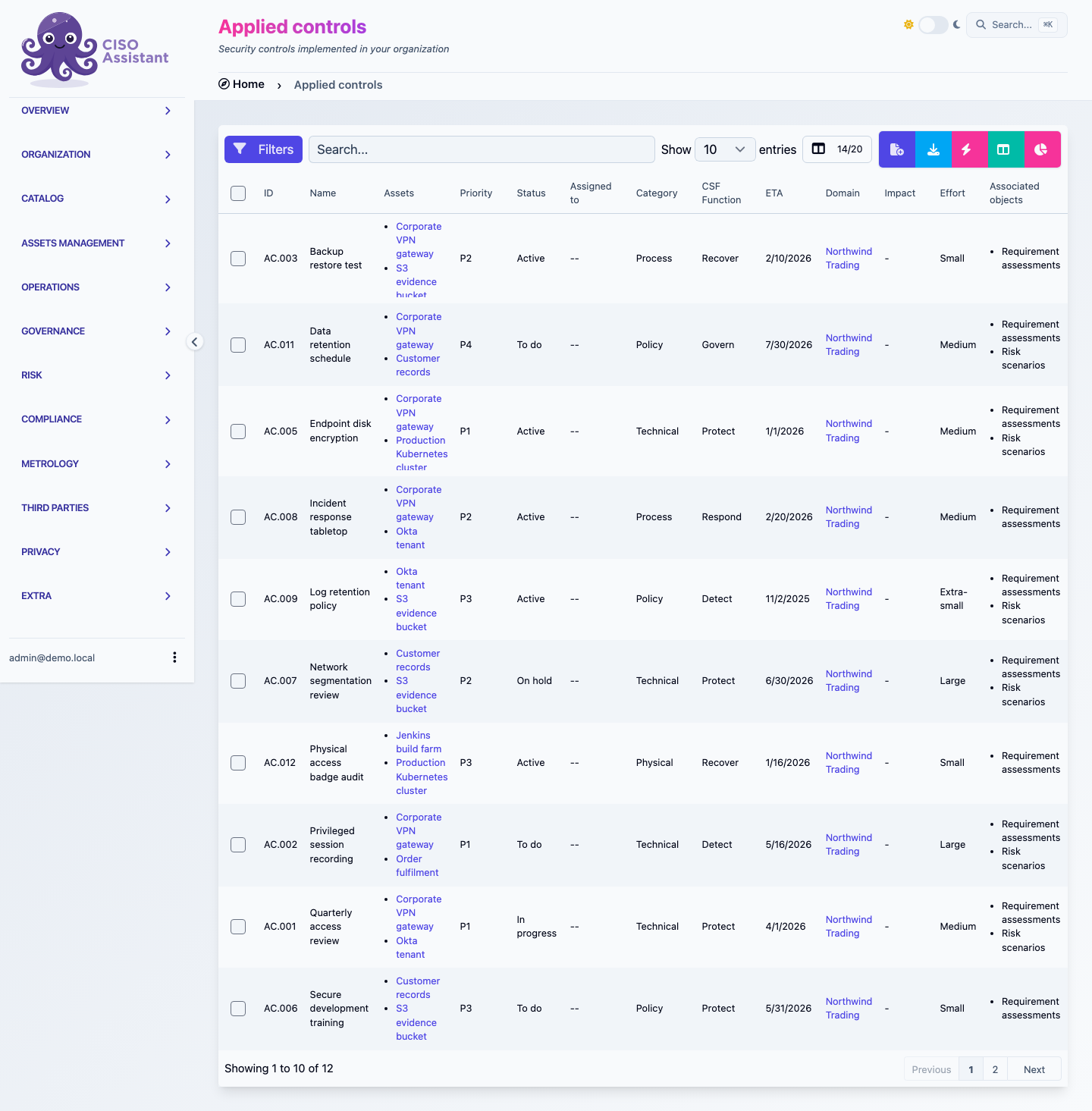
The applied control list, showing Status, Priority and ETA together
## Financial tracking
Applied controls carry a structured **cost** field, so the financial weight of your security programme isn't a separate spreadsheet — it's attached to the controls themselves and rolled up wherever they appear (most notably on every [action plan](/ciso-assistant/features/action-plans.md)).
The platform models the **build vs run** distinction that controls actually carry in practice:
| Cost type | Meaning | How it's counted |
| --------- | -------------------------------------------------------------------------------------------------------------------------------------------- | ------------------------------------------------------------------------------ |
| **Build** | One-shot setup cost — buying hardware, integrating a tool, drafting and approving a policy, running a project to roll out the control | Amortised over the configured **amortisation period** (in years) |
| **Run** | Ongoing operational cost — licence renewals, the time spent every quarter on access reviews, the hours of the team that operates the control | Counted as an annual cost — applied every year for as long as the control runs |
Each side accepts two inputs:
* **Fixed cost** — a money amount (hardware purchase, licence fee, contractor invoice).
* **People days** — a measure of internal effort. The platform converts this to money using the **daily rate** configured in **General settings**, so internal time is comparable with external spend.
From these inputs, the platform computes an **annual cost** for every control:
$$
\text{annual cost} = \frac{B\_{\text{fixed}} + B\_{\text{days}} \cdot r}{T} + R\_{\text{fixed}} + R\_{\text{days}} \cdot r
$$
| Symbol | Meaning |
| --------------------------------------- | --------------------------------------------- |
| *B*fixed, *B*days | Build fixed cost and people-days |
| *R*fixed, *R*days | Run fixed cost and people-days |
| *r* | Configured daily rate (from General settings) |
| *T* | Amortisation period, in years |
That single number is what feeds every roll-up — the action plan's budget overview, the per-assignee and per-domain breakdowns, the by-status / by-priority / by-CSF-function totals. Controls without a cost set contribute zero, so partial adoption of the financial tracking still works — you fill in numbers where you have them and the totals reflect what's known.
The annualised view matters because cybersecurity controls are continuous (see [Why "Active" — and why no "Done"](#why-active--and-why-no-done) above). A capex-style "we paid €40k once" view doesn't compare well across controls; an "annual cost in steady state" view lets you put a single line per control on the budget and compare them like-for-like.
## Reference control
A **reference control** is a template for an applied control. Reference controls facilitate the creation of applied controls and help keep them consistent across the organisation.
They can be provided by security frameworks imported from a library, or you can create your own — in the global domain or in a specific domain. Reference controls are optional but recommended.
## Policy
A **policy** is a specific type of applied control: a document describing what is expected from some part of your stakeholders. Putting your cybersecurity policies in CISO Assistant makes them readily available for audits, and lets you manage their lifecycle alongside the rest of your controls.
## Related
* [Policies](/ciso-assistant/concepts/governance/policies.md)
* [Audits](/ciso-assistant/concepts/compliance/audits.md)
* [Findings binders](/ciso-assistant/concepts/governance/findings-assessments.md)
* [Philosophy → Decoupling principle](/ciso-assistant/introduction/philosophy.md)
* [Vocabulary → Applied control / Reference control / Evidence](/ciso-assistant/introduction/vocabulary.md)
---
# Agent Instructions
This documentation is published with GitBook. GitBook is the documentation platform designed so that both humans and AI agents can read, navigate, and reason over technical content effectively. Learn more at gitbook.com.
## Querying This Documentation
If you need additional information that is not directly available in this page, you can query the documentation dynamically by asking a question.
Perform an HTTP GET request on the current page URL with the `ask` query parameter, and the optional `goal` query parameter:
```
GET https://intuitem.gitbook.io/ciso-assistant/concepts/operations/applied-controls.md?ask=&goal=
```
`ask` is the immediate question: it should be specific, self-contained, and written in natural language.
`goal` is optional and describes the broader end goal you are ultimately trying to accomplish on behalf of the user. GitBook uses it to tailor the answer towards what is most useful for that goal.
The response will contain a direct answer to the question and relevant excerpts and sources from the documentation.
Use this mechanism when the answer is not explicitly present in the current page, you need clarification or additional context, or you want to retrieve related documentation sections.