> For the complete documentation index, see [llms.txt](https://intuitem.gitbook.io/ciso-assistant/llms.txt). Markdown versions of documentation pages are available by appending `.md` to page URLs; this page is available as [Markdown](https://intuitem.gitbook.io/ciso-assistant/concepts/foundations/domains.md).
# Domains
A **domain** is a top-level container in CISO Assistant. It represents an organisational scope — a business unit, a subsidiary, or any boundary you want to manage access and reporting around.
Domains are the platform's primary mechanism for **access control** and **reporting boundaries**: a user's roles are granted *on a domain*, and most reports, dashboards, and audit roll-ups can be filtered by domain.
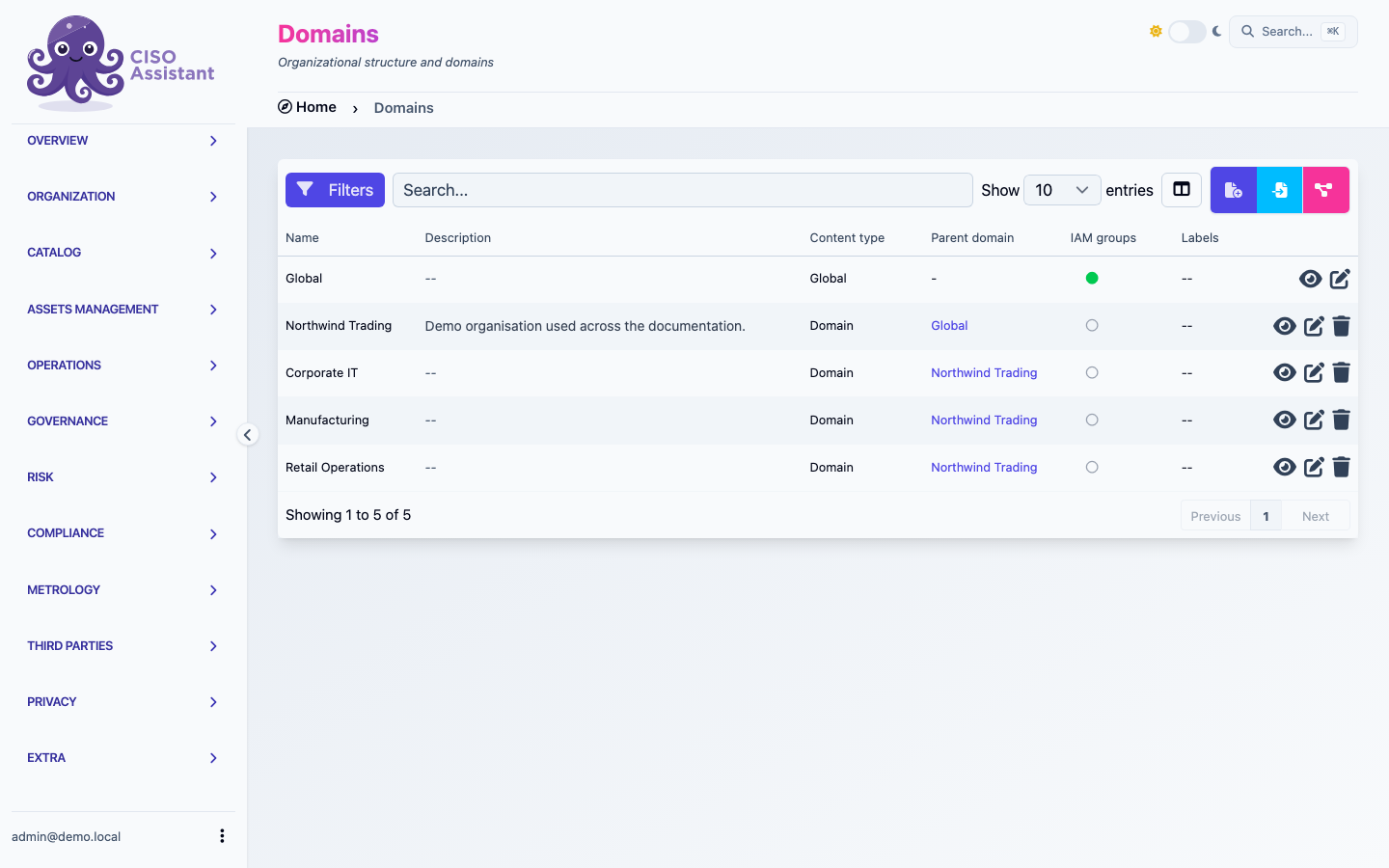
The domain list — the Parent domain column is what makes the hierarchy visible
## Building a hierarchy
A domain can have a **parent domain** (`parent_folder` internally) — that's how you build a tree of sub-domains beneath a top-level one. The hierarchy lets you mirror the shape of your organisation in the platform: a "Group" domain on top, "Region" or "Subsidiary" domains beneath, "Business unit" or "Programme" domains beneath those, and so on.
When a parent-child relationship is in place, two things follow:
* **Permissions can flow downward.** A user with a role on a parent domain can be configured to see and act on objects in its sub-domains, without re-assigning them at every level.
* **Reporting can roll up.** Dashboards and analytics aggregate across a domain *and* its descendants, so leadership-level views work the same way the org chart does.
{% hint style="info" %}
**Sub-domains are an Enterprise (PRO) feature.** The community edition ships with a flat structure — every domain you create sits directly at the root. The **Parent domain** field on the domain form is only exposed in the Enterprise edition, where you can nest domains to whatever depth you need to mirror your organisation.
{% endhint %}
The root is reserved for global, cross-organisation objects (built-in catalogues, the global library) — your own domains always live one level under it, even when no other hierarchy is in place.
## Organisational-only domains — the "Create IAM groups" flag
Not every domain needs to be an IAM boundary. Sometimes you want a domain purely as an **organisational container** — a folder in the tree to group related work — without the platform spinning up the per-role user groups that come with a "real" scoping domain.
The **Create IAM groups** checkbox on the domain form controls this:
* **On** *(default for new domains)* — the platform auto-provisions one user group per role for the domain. Anyone who needs access to objects in this domain gets placed into one of those groups; the domain is a true IAM scope.
* **Off** — no user groups are created. The domain exists in the tree, can be picked from selectors, and can host objects, but it carries **no scoping machinery of its own**. Access flows from whatever parent domain it sits under.
Turn the flag off when you want sub-domains that are just structure — for example, breaking a "Subsidiary" domain into a "2025 audits" / "2026 audits" tree purely for organisation, without giving each year its own IAM surface. The setting is shown by the on-form help text: *"IAM groups are used to assign roles to users."*
The flag is **not a one-way choice**. You can flip it on a domain at any time — turning it on later provisions the per-role user groups, turning it off later removes them. So a domain you initially created as a pure folder can later become a real IAM scope (or vice versa) without recreating it or moving its content.
## Restructuring the tree
The hierarchy is **not frozen at creation**. Editing a domain lets you change its **Parent domain** (PRO), which moves the whole sub-tree — the domain itself and every domain beneath it — under the new parent. Use this to:
* Reorganise as your business changes (a programme becomes a subsidiary, two business units merge).
* Promote a sub-domain to top-level by setting its parent back to the root.
* Re-parent for IAM reasons (giving a parent role-holder access to a sub-tree that wasn't previously under them).
The platform prevents cycles — you can't move a domain under one of its own descendants — but everything else is reachable.
## Objects move between domains
Almost every operational object in CISO Assistant is bound to a domain: assessments and audits, applied controls, evidences, risk scenarios, assets, tasks, policies, findings, incidents, exceptions, contracts, entities, and so on. The domain a record lives in is what drives who can see it and how it rolls up in reports.
Because reorganisations happen, the domain assignment is **not permanent**:
* **One at a time** — edit any object and pick a different **Domain** in the form. The platform re-evaluates IAM scoping on save, so the object disappears from one domain's views and appears in the other's.
* **In bulk** — for models that opt in to bulk operations, the [batch actions](/ciso-assistant/features/working-with-tables.md#batch-actions-many-rows) toolbar exposes a **Change folder** action: select multiple rows in the table, choose the destination domain, and the move is applied across the selection in one go. Useful when reorganising a subsidiary into its own sub-tree, or pulling a programme's controls into a dedicated domain.
A handful of objects whose domain is forced by a parent (e.g. risk scenarios always inherit their risk assessment's domain) intentionally don't expose the batch **Change folder** action — moving the parent moves the children.
## Related
* [Perimeters](/ciso-assistant/concepts/foundations/perimeters.md)
* [Actors and teams](/ciso-assistant/concepts/foundations/actors-and-teams.md) — how users, teams, and entities get scoped to a domain
---
# Agent Instructions
This documentation is published with GitBook. GitBook is the documentation platform designed so that both humans and AI agents can read, navigate, and reason over technical content effectively. Learn more at gitbook.com.
## Querying This Documentation
If you need additional information that is not directly available in this page, you can query the documentation dynamically by asking a question.
Perform an HTTP GET request on the current page URL with the `ask` query parameter, and the optional `goal` query parameter:
```
GET https://intuitem.gitbook.io/ciso-assistant/concepts/foundations/domains.md?ask=&goal=
```
`ask` is the immediate question: it should be specific, self-contained, and written in natural language.
`goal` is optional and describes the broader end goal you are ultimately trying to accomplish on behalf of the user. GitBook uses it to tailor the answer towards what is most useful for that goal.
The response will contain a direct answer to the question and relevant excerpts and sources from the documentation.
Use this mechanism when the answer is not explicitly present in the current page, you need clarification or additional context, or you want to retrieve related documentation sections.