> For the complete documentation index, see [llms.txt](https://intuitem.gitbook.io/ciso-assistant/llms.txt). Markdown versions of documentation pages are available by appending `.md` to page URLs; this page is available as [Markdown](https://intuitem.gitbook.io/ciso-assistant/concepts/compliance/audits.md).
# Audits
An **audit** is the evaluation of a perimeter against a framework. It produces a per-requirement view of status, score, evidence, and the applied controls that substantiate each requirement.
Because applied controls are decoupled from compliance requirements, a single set of controls can be evaluated against many frameworks in parallel without re-doing the work.
## Mental model
```mermaid
graph LR
D[Domain] -->|scopes| CA[Audit]
P[Perimeter] -.->|narrows| CA
F[Framework] -->|standard for| CA
CA -->|comprises| RA[Requirement assessment]
RA -->|evaluates| RN[Requirement]
RA -->|satisfied by| AC[Applied controls]
RA -->|evidenced by| EV[Evidences]
```
An audit always lives inside a **domain** (the mandatory IAM scope) and is assessed against one **framework**. A **perimeter** can optionally narrow the audit further — e.g. to a specific service or process inside the domain. On creation the platform spawns one **requirement assessment** per requirement in the framework — those rows are where status, score, and the supporting **applied controls** and **evidences** live.
| User-facing | Internal | Notes |
| ---------------------- | ----------------------- | ------------------------------------------------------------- |
| Audit | `ComplianceAssessment` | One audit = one framework × one domain (× optional perimeter) |
| Requirement assessment | `RequirementAssessment` | Per-requirement row inside the audit |
| Requirement | `RequirementNode` | Read-only catalog entry from the framework library |
| Domain | `Folder` | Required; drives IAM scoping |
| Framework | `Framework` | Read-only library import |
## Framework
The fundamental input to an audit is a **framework** — a published standard such as ISO/IEC 27001:2022 or NIST CSF. Frameworks ship as YAML libraries. If you can't find one that fits your needs, you can build your own and import it.
## Audit
An audit assesses compliance against the chosen framework. The evaluation of a single requirement inside an audit is called a **requirement assessment**.
A requirement assessment is not a single value — it captures *several dimensions* at once, separating **the compliance result** from **how the work got done** and from **the depth of the implementation**. The point is that the same row tracks the auditor's view, the analyst's progress, and the maturity of the underlying implementation without conflating them.
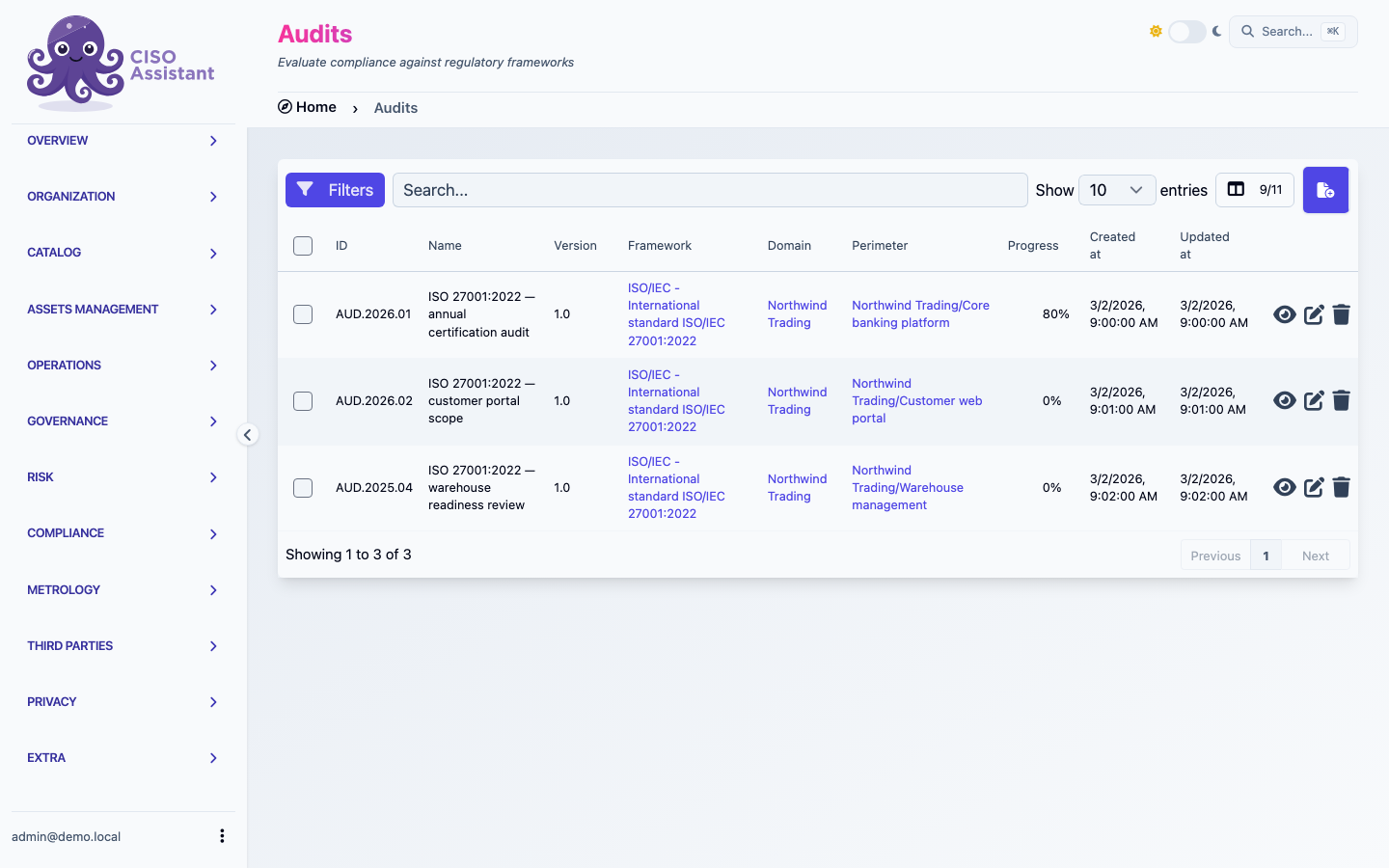
Audits listed with their framework, perimeter and Progress percentage
### Progress column
Every audit in the audit tables (and on dashboards and campaigns) shows a **Progress** percentage. It answers a single question: *how much of the audit has been assessed?*
What counts as **assessed** depends on which fields the audit exposes to the auditor. A single rule drives every surface (audit tables, the audit page, journeys, and My assignments), so the number never diverges between views:
* **Status mode** — the default, and active whenever the [workflow status](#analyst-dimension-assignee--workflow-status) field is visible to the auditor. A requirement counts as assessed only once its status is **Done**. Nothing else moves the needle: a requirement can already be *Compliant* or scored and still not count until it is explicitly marked **Done**. This makes progress the analyst's own "I'm finished with this one" signal.
* **Content mode** — active when the status field is hidden. A requirement counts as assessed when:
* for **questionnaire** requirements, the questionnaire is **fully answered** (every question answered), or it already carries a result or a score;
* otherwise, when the **result** is visible, as soon as it leaves the default **Not assessed** state (**Compliant**, **Partially compliant**, **Non compliant**, or **Not applicable**);
* otherwise, for **scoring-only** audits, when the score is *strictly above* the applicable minimum of the scale.
Enabling scoring pre-fills every requirement at the scale minimum, so a bare minimum score is treated as "not touched yet" and does **not** count. Only a score genuinely moved above the minimum counts as assessed, which stops empty maturity- or scoring-only audits from showing 100%.
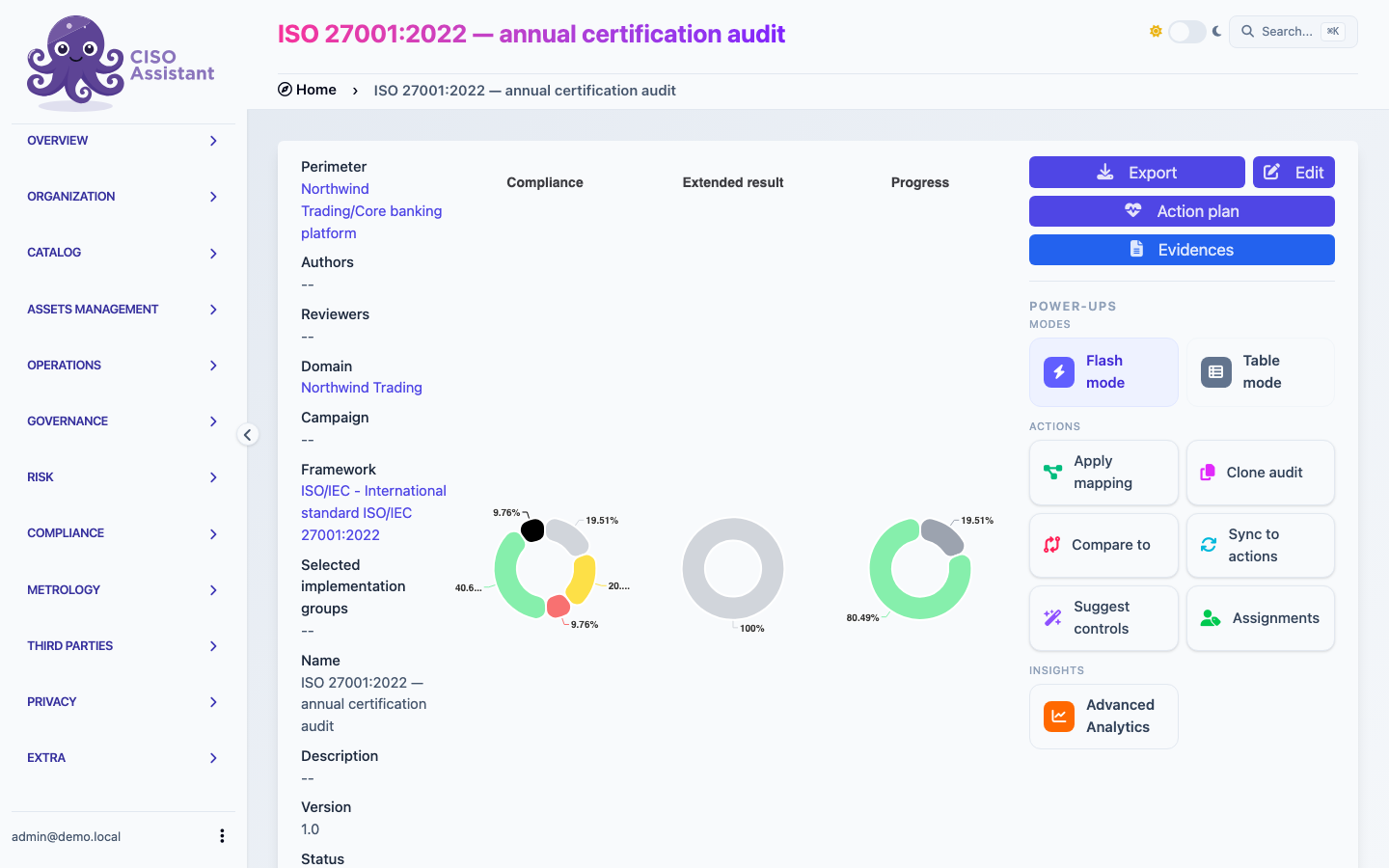
In other words, **progress is an auditing-activity signal, not a compliance signal**. An audit can be 100% *in progress* and still be largely non-compliant — the column tells you the team has gone through every requirement and reached a verdict, not that the verdicts are good. The actual compliance picture lives in the donut and score read-outs computed from the [compliance result](#compliance-result) below.
Only **assessable** requirements count toward the denominator — section titles and headings from the framework are skipped. When the audit is scoped to specific [implementation groups](#implementation-groups), only the requirements inside those groups count, so progress reflects the work you actually committed to rather than the framework's full catalogue.
### Implementation groups
Several frameworks ship with their requirements pre-tagged into **implementation groups (IG)** — labels that act as filters over the requirement catalogue. They serve two recurring purposes, depending on how the framework's authors used them:
* **Maturity tiers** — *basic / intermediate / advanced* (CIS Controls' IG1 / IG2 / IG3, CyFun's *Basic / Important / Essential*, FedRAMP's *Low / Moderate / High*). Picking IG1 narrows the audit to the minimum baseline; IG2 adds the next tier; IG3 expands to the full catalogue. This is the "how mature do we want to be?" axis.
* **Scope or applicability** — slices like *physical security*, *SaaS*, *cloud*, or framework-specific selectors like ISO 27001's `SoA` group. Picking these narrows the audit to the requirements that actually apply to your context, regardless of maturity.
The two patterns are not exclusive — a single framework can mix them, and several IGs can be combined on the same audit. If no IG is selected the audit covers the full catalogue, and you can change the selection later (adding or removing IGs) without losing the work already done on requirements that stay in scope.
Where IGs show up in the platform:
* **Audit scope** — selected at creation, editable afterwards. Anything outside the selection isn't dropped, it's simply hidden from the audit's assessable count.
* **Progress, score, donut, and analytics** — all roll-ups respect the IG selection. The [Implementation Groups Breakdown](/ciso-assistant/features/audit-analytics.md) widget in audit analytics shows progress *per IG* when you want to compare tiers.
* **Framework report** — the report filter lets you re-slice the audit by IG after the fact, so the same audit can produce an IG1-only view and a full-catalogue view without re-running the assessment.
See [Multi-level support](/ciso-assistant/features/multi-level-support.md) for the mechanic of selecting IGs at audit creation, and the framework library's own documentation for which IG taxonomy a given standard ships with.
### Compliance result
The headline dimension — the actual answer to *"does this requirement hold?"*. Each requirement carries one of:
* **Compliant**
* **Partially compliant**
* **Non compliant**
* **Not applicable**
This is the field that feeds the framework's compliance percentages, the report, and the cross-framework roll-ups.
For questionnaire-driven frameworks (whether authored in the [library builder](/ciso-assistant/configuration/authoring/library-builder.md#add-questions-and-choices) or imported from an [Excel source](/ciso-assistant/configuration/authoring/excel.md) — same vocabulary on both paths), the result is computed from the `compute_result` tag carried by each question choice and aggregated *worst-wins* across the requirement's questions, with `not_applicable` neutral.
Text type questions are not taken into account for the result computation: leaving one empty does not hold the requirement at **Not assessed**.
If you maintain a tenant whose audits were produced under the older boolean-collapse logic, see [Special cases — Recompute assessment results](/ciso-assistant/installation/maintenance/special-cases.md#recompute-assessment-results-after-the-semantic-compute_result-upgrade) for the realignment procedure.
The audit page — the compliance donut summarises the results across every assessable requirement
### Analyst dimension (assignee + workflow status)
Independently of the compliance result, each requirement assessment captures *who is working on it* and *where they are in their process*:
* An **assignee** (an actor — user, team, or entity) — who is responsible for assessing this requirement.
* A **workflow status** — **To do** / **In progress** / **In review** / **Done**. This is the *analyst's* status, not the auditor's verdict.
The two layers exist because the same requirement can be *Compliant* but still *In review* (the analyst has reached a conclusion, but a peer hasn't validated it yet) — and an *In progress* requirement obviously doesn't have a final compliance result yet. Splitting analyst progress from compliance result lets dashboards and the campaign view show meaningful "still to do" counts without polluting the compliance percentage.
### Extended results (severity of non-conformities)
When you enable [extended results](/ciso-assistant/concepts/compliance/audits/extended-results.md) on the audit, each non-compliant or partially-compliant requirement can carry an additional qualification on a specific scale:
* **Major nonconformity**
* **Minor nonconformity**
* **Observation**
* **Opportunity for improvement**
* **Good practice**
This is the auditor's grading language, useful when the framework requires distinguishing *major* from *minor* non-conformities (ISO certification audits being the canonical case). It's an extra layer attached to the result — not a replacement for it.
### Scoring layers
Beyond the binary compliance result, each requirement assessment can carry a **score** on the framework's scale. Scoring captures *how mature or deep* an implementation is, not just whether it exists. There are two ways to score, depending on what the audit needs:
* **Maturity score** *(single layer)* — one score per requirement, typically used for CMMI-style or NIST-CSF-style maturity assessments.
* **Implementation + Documentation scores** *(two layers)* — toggle on **documentation score** to split scoring into *is this implemented?* and *is the implementation documented?*. The platform computes the maturity score as the average of the enabled layers.
Each requirement assessment uses an **effective scoring scale**. At audit runtime the fallback is the audit's own scoring scale (`ComplianceAssessment`), which is usually initialised from the framework when the audit is created. A requirement can override that audit-level scale with its own `min_score`, `max_score`, and level labels. The scoring UI, documentation score, exports, and tree views use that effective scale for the requirement.
When an audit contains mixed scales, average-based roll-ups normalise each requirement against its effective range before aggregating, then display the result on the audit scale. Sum-based roll-ups stay raw: they add `score x weight`, and their maximum is the sum of each requirement's effective maximum times its weight.
If **anchor N/A to target** is enabled, not-applicable requirements contribute the audit target projected onto their own effective range. If no target is configured, they contribute their effective maximum.
Together with the compliance result, the analyst dimension, the extended results, and the scoring layers, a single requirement assessment can record: *what's the compliance state*, *who is working on it and where they are*, *how severe any non-conformity is*, and *how mature the implementation is* — all without conflating them.
### Comments
Each requirement assessment can carry a thread of **comments** — short, dated, author-attributed notes used for in-context conversation during the audit. They sit alongside the formal fields and don't change the compliance result or the score; they're where the back-and-forth between the analyst, the reviewer, and the auditee happens (clarifications, follow-up questions, agreed-upon next steps).
Each comment has a body, an author, a creation timestamp, and an **active / processed** toggle so resolved threads can be filtered out of the default view without losing the history. Comments can be edited (the platform records the edited state), preserving who said what and when. The panel is collapsed by default and shows the comment count, so it stays out of the way until you open it.
Comments are not exclusive to requirement assessments — the same thread is available on **risk scenarios**, **applied controls**, and **findings**.
On audits, **Comments** is governed by two controls: the `comments` [feature flag](/ciso-assistant/configuration/settings/feature-flags.md) (the platform-wide master switch, default on) and the per-audit [field-visibility editor](/ciso-assistant/guides/assessments/customize-audit.md), which lets you make the thread visible to respondents, auditor-only, or hidden. So you can keep comments enabled everywhere while still hiding the discussion from third-party respondents on a sensitive audit. Authors are also masked for third-party participants who can't see other users.
See [Comments](/ciso-assistant/features/comments.md) for the full feature reference — processed state, edit history, permissions, and author privacy.
## Evidence
Evidence justifies the status of a compliance requirement or proves that an applied control has been implemented. It can be a description, a link, or an uploaded file, and it can be attached to any number of applied controls or requirement assessments.
## Raising findings
With the **findings\_from\_requirements** [feature flag](/ciso-assistant/configuration/settings/feature-flags.md) on, a requirement assessment gains a **Findings** tab. **Raise a finding** records a non-compliance without leaving the requirement; the picker next to it binds an existing finding, so an issue raised elsewhere (a pentest binder, say) is tied to the requirement it violates. The audit's own findings collect in a [findings binder](/ciso-assistant/concepts/governance/findings-assessments.md#raising-a-finding-from-a-requirement) created on first use.
A finding belongs to one requirement assessment at a time. The picker only offers findings not bound to another requirement; to move one, edit the finding itself. Binding and unbinding are refused while the finding's binder is locked, and a locked audit does not take new findings. Raising needs permission to add findings, picking needs permission to change them.
## Related
* [Applied controls](/ciso-assistant/concepts/operations/applied-controls.md)
* [Findings binders](/ciso-assistant/concepts/governance/findings-assessments.md)
* [Perimeters](/ciso-assistant/concepts/foundations/perimeters.md)
* [Vocabulary → Audit / Requirement / Evidence](/ciso-assistant/introduction/vocabulary.md)
---
# Agent Instructions
This documentation is published with GitBook. GitBook is the documentation platform designed so that both humans and AI agents can read, navigate, and reason over technical content effectively. Learn more at gitbook.com.
## Querying This Documentation
If you need additional information that is not directly available in this page, you can query the documentation dynamically by asking a question.
Perform an HTTP GET request on the current page URL with the `ask` query parameter, and the optional `goal` query parameter:
```
GET https://intuitem.gitbook.io/ciso-assistant/concepts/compliance/audits.md?ask=&goal=
```
`ask` is the immediate question: it should be specific, self-contained, and written in natural language.
`goal` is optional and describes the broader end goal you are ultimately trying to accomplish on behalf of the user. GitBook uses it to tailor the answer towards what is most useful for that goal.
The response will contain a direct answer to the question and relevant excerpts and sources from the documentation.
Use this mechanism when the answer is not explicitly present in the current page, you need clarification or additional context, or you want to retrieve related documentation sections.