> For the complete documentation index, see [llms.txt](https://intuitem.gitbook.io/ciso-assistant/llms.txt). Markdown versions of documentation pages are available by appending `.md` to page URLs; this page is available as [Markdown](https://intuitem.gitbook.io/ciso-assistant/concepts/catalog/risk-matrices.md).

# Risk matrices

The lookup tables that derive a risk level from probability and impact

A **risk matrix** is a configurable lookup table that maps a `(probability, impact)` pair to a resulting risk level. It's what turns "likely × severe" into "critical" — the encoded judgement that lets a risk assessment be more than a free-form narrative.

Risk matrices are catalog objects: defined once, packaged into libraries, loaded into the platform, and reused across many risk assessments.

## Mental model

```mermaid
graph LR
  L[Library] -->|bundles| RM[Risk matrix]
  RM -->|defines| PROB[Probability axis]
  RM -->|defines| IMP[Impact axis]
  RM -->|defines| GRID[P x I grid]
  RA[Risk assessment] -->|locked to| RM
  RS[Risk scenario] -->|reads cell from| RM
```

A risk matrix is a JSON definition (probability axis, impact axis, risk levels, and the grid linking them) bundled in a library. Once a risk assessment is created against a matrix the binding is permanent — the FK uses `on_delete=PROTECT` — because switching matrices mid-assessment would silently change every risk level, which is what auditors don't want. Each risk scenario in the assessment reads its inherent, current, and residual risk levels from the same matrix's grid using the `(probability, impact)` pair the assessor sets at each tier.

| User-facing     | Internal         | Notes                                                     |
| --------------- | ---------------- | --------------------------------------------------------- |
| Risk matrix     | `RiskMatrix`     | `json_definition` with probability / impact / risk / grid |
| Risk assessment | `RiskAssessment` | `risk_matrix` FK is fixed at creation (`PROTECT`)         |

## Anatomy

A matrix has four pieces:

* **Probability levels** — the ordered scale used for likelihood (e.g. negligible, low, medium, high, very high).
* **Impact levels** — the ordered scale used for severity (financial, reputational, operational, or whatever scale the organisation uses).
* **Risk levels** — the resulting categories (e.g. low / medium / high / critical), usually colour-coded.
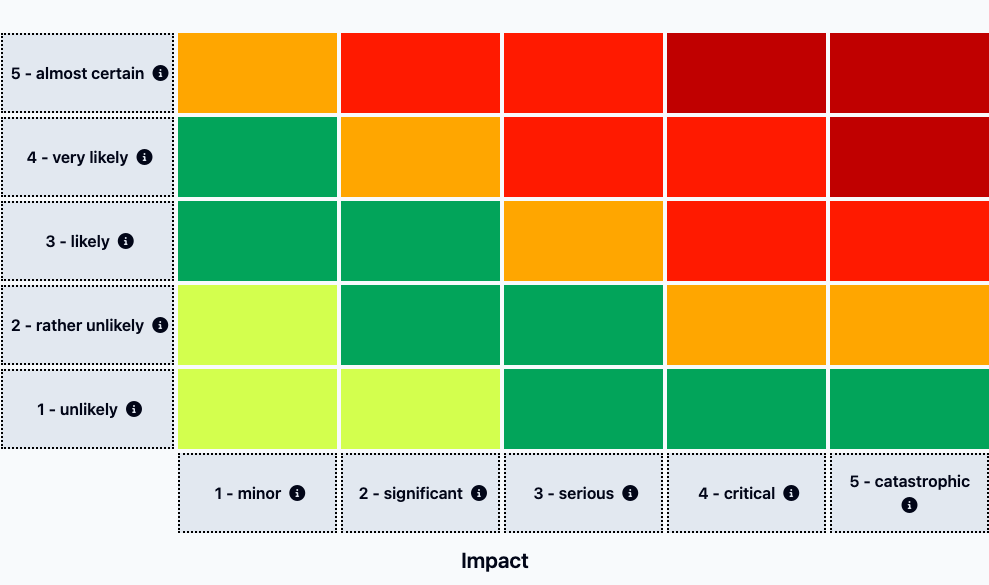
* **The grid** — the lookup from each `(probability × impact)` cell to a risk level.

The grid is the substance of the matrix; the visual rendering (orientation, colours, layout) is handled by the UI based on the loaded matrix definition.

<figure><img src="https://629777851-files.gitbook.io/~/files/v0/b/gitbook-x-prod.appspot.com/o/spaces%2FCqFeU3oPCgDWkkR386NK%2Fuploads%2Fgit-blob-bf5aa1e25489d0b6d7cbe0a465e64d7c3050b5dc%2Frisk-matrix-detail.png?alt=media" alt=""><figcaption><p>The 5x5 ISO-27005 grid: probability levels down the side, impact levels along the bottom, each cell resolving to a risk level</p></figcaption></figure>

## Why a matrix is fixed per risk assessment

When a risk assessment is created, its risk matrix is captured and **stays fixed** for the lifetime of that assessment. Re-evaluating the same scenarios against a different matrix would silently change the risk levels under your feet, which is exactly what auditors don't want.

If you change matrices mid-programme, you create a new risk assessment against the new matrix and migrate the scenarios. The old assessment keeps its history; the new one starts clean against the new scale.

## Three-tier evaluation

Each scenario in a risk assessment is evaluated three times against the chosen matrix:

* **Inherent risk** — what the risk would be with no controls.
* **Current risk** — what it is today given existing applied controls.
* **Residual risk** — what it will be once planned applied controls are implemented.

The matrix is the same for all three tiers; what changes is the `(probability, impact)` pair the assessor sets at each tier. See [Risk assessments](/ciso-assistant/concepts/risk/risk-assessments.md) for how the three tiers are used.

## Authoring a matrix

Matrices ship as YAML libraries — the same format as frameworks, with `_meta` and `_content` sheets defining the probability/impact/risk axes and the grid. They are typically authored in Excel using the templates under `tools/excel/matrix/` and converted to YAML.

Designing a matrix correctly — particularly the grid — is non-trivial. Start from one of the existing examples and adapt the levels and grid logic rather than building from scratch. See [Designing your own libraries](/ciso-assistant/configuration/libraries/custom-libraries.md).

## Related

* [Risk assessments](/ciso-assistant/concepts/risk/risk-assessments.md)
* [Libraries](/ciso-assistant/concepts/catalog/libraries.md)
* [Vocabulary → Risk matrix](/ciso-assistant/introduction/vocabulary.md)
* [Designing your own libraries](/ciso-assistant/configuration/libraries/custom-libraries.md)


---

# Agent Instructions
This documentation is published with GitBook. GitBook is the documentation platform designed so that both humans and AI agents can read, navigate, and reason over technical content effectively. Learn more at gitbook.com.

## Querying This Documentation
If you need additional information that is not directly available in this page, you can query the documentation dynamically by asking a question.

Perform an HTTP GET request on the current page URL with the `ask` query parameter, and the optional `goal` query parameter:

```
GET https://intuitem.gitbook.io/ciso-assistant/concepts/catalog/risk-matrices.md?ask=<question>&goal=<endgoal>
```

`ask` is the immediate question: it should be specific, self-contained, and written in natural language.
`goal` is optional and describes the broader end goal you are ultimately trying to accomplish on behalf of the user. GitBook uses it to tailor the answer towards what is most useful for that goal.

The response will contain a direct answer to the question and relevant excerpts and sources from the documentation.

Use this mechanism when the answer is not explicitly present in the current page, you need clarification or additional context, or you want to retrieve related documentation sections.
